qrcode-gen.com에서 QR 코드에 브랜드 로고를 추가하는 방법 안내

디지털 시대에는 브랜드가 모든 접점에서 돋보여야 사용자에게 강한 인상을 남길 수 있습니다. QR 코드는 웹사이트, 메뉴, 개인 프로필, 마케팅 캠페인 등 다양한 디지털 정보에 빠르게 연결할 수 있는 인기 도구가 되었습니다. 하지만 수많은 유사한 QR 코드들 사이에서, 어떻게 하면 브랜드가 진정으로 돋보이고 오래 기억에 남을 수 있을까요?


핵심 솔루션은 모든 접점에서 브랜드 존재감을 높이는 것이며, 특히 브랜드 로고를 QR 코드에 직접 통합하는 것입니다. 로고가 QR 코드에 바로 표시되면, 고객이 스캔할 때마다 브랜드가 인식에 도달하여 인지도를 높이고 신뢰를 쌓는 데 도움이 됩니다. 제품 포장, 옥외광고, 포스터, 커뮤니케이션 자료 등 모든 기회를 최대한 활용해 브랜드가 고객의 모든 접점에 함께하도록 하세요.


왜 QR 코드에 로고를 추가해야 할까요?

1. 브랜드 인지도 향상

일반적인 QR 코드는 단순한 흑백 사각형의 집합일 뿐입니다. 하지만 QR 코드 중앙에 로고를 삽입하면 고객은 스캔하기 전에 즉시 브랜드를 인식할 수 있습니다. 이는 다음과 같은 간단한 방법입니다:

  • 첫눈에 강한 인상을 남길 수 있습니다
     
  • 고객이 로고와 브랜드 이미지를 기억하도록 돕습니다
     
  • 파트너와 고객에게 전문성을 높여줍니다
     

2. 신뢰도 향상 – 스캔 시 망설임 감소

사용자들은 출처가 불분명한 QR 코드를 마주할 때 종종 망설입니다. 코드 중앙에 로고를 표시하면 고객이 QR 코드가 어디로 연결되는지(예: 레스토랑 메뉴, 회사 웹사이트 등)를 명확히 알 수 있어, 특히 마케팅 캠페인에서 스캔할 때 더 안심할 수 있습니다.
 

3. 더 개성 있고 미적임

로고가 들어간 QR 코드는 전문적이고 미적이며, 브랜드 아이덴티티와 잘 어울립니다. 명함, 제품 포장, 스탠디/광고, 이벤트 랜딩 페이지 등에 사용할 때 큰 장점이 됩니다.
 

qrcode-gen.com에서 로고가 있는 QR 코드 만들기

1단계: qrcode-gen.com 플랫폼 접속

공식 웹사이트에 접속하세요: https://qrcode-gen.com

이 사이트는 무료 QR 코드 생성기 중 하나로, 회원가입 없이도 쉽게 로고 삽입 기능을 지원합니다.

2단계: 생성할 QR 코드 유형 선택

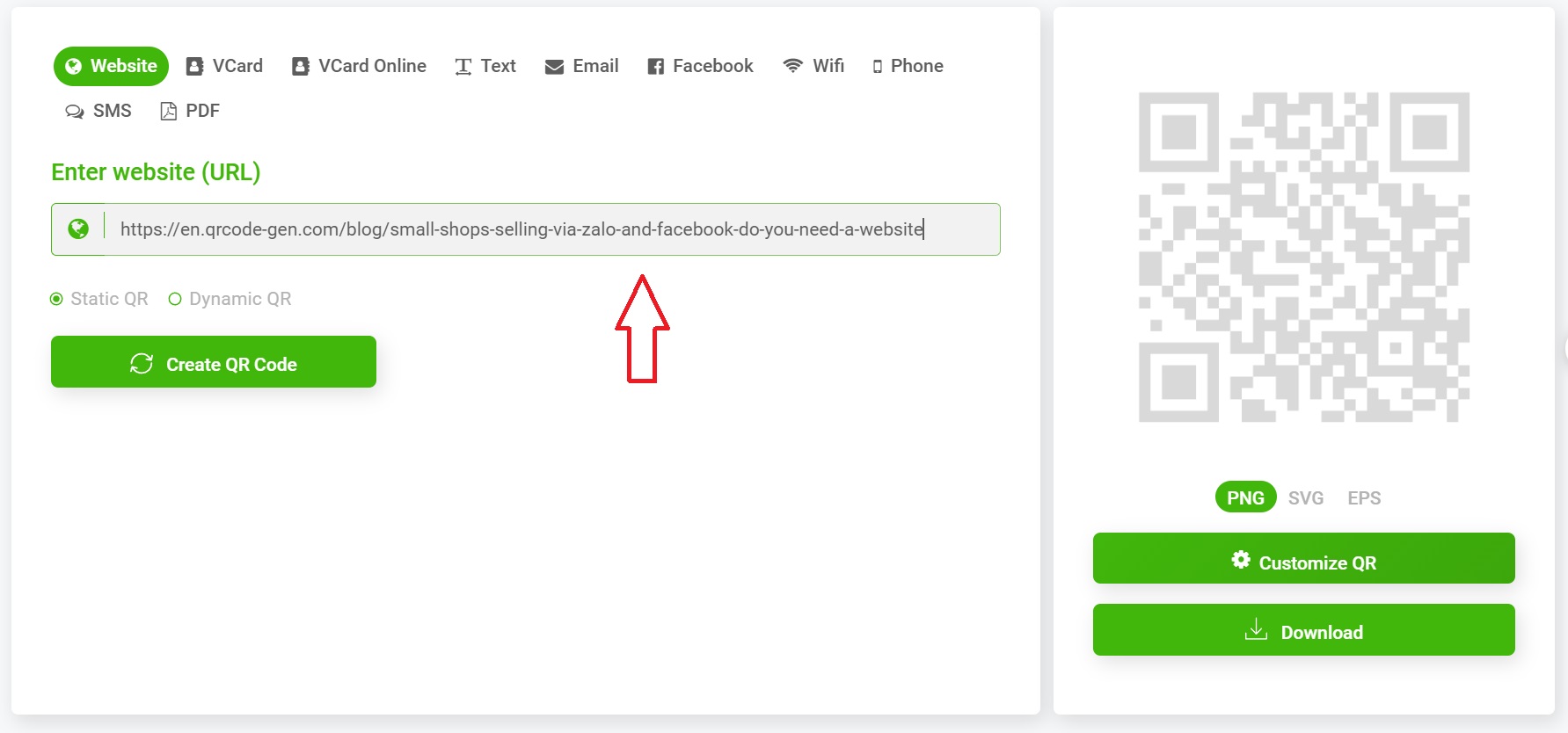
메인 화면에서 다양한 옵션을 볼 수 있습니다:

  • URL
  • vCard
  • vCard Online
  • Text
  • Email
  • Facebook
  • WiFi
  • Phone
  • SMS
  • PDF
     

QR 코드가 표시할 형식을 선택하고, 박스에 링크를 입력하세요.
3단계: 링크 입력 후 “QR 코드 생성” 선택

필요한 박스에 링크나 내용을 입력 → “Create QR Code” 버튼을 클릭하세요.

즉시 원본 QR 코드(로고 없음)가 생성됩니다.


4단계: QR 코드 커스터마이즈

이 단계에서 다음을 할 수 있습니다:

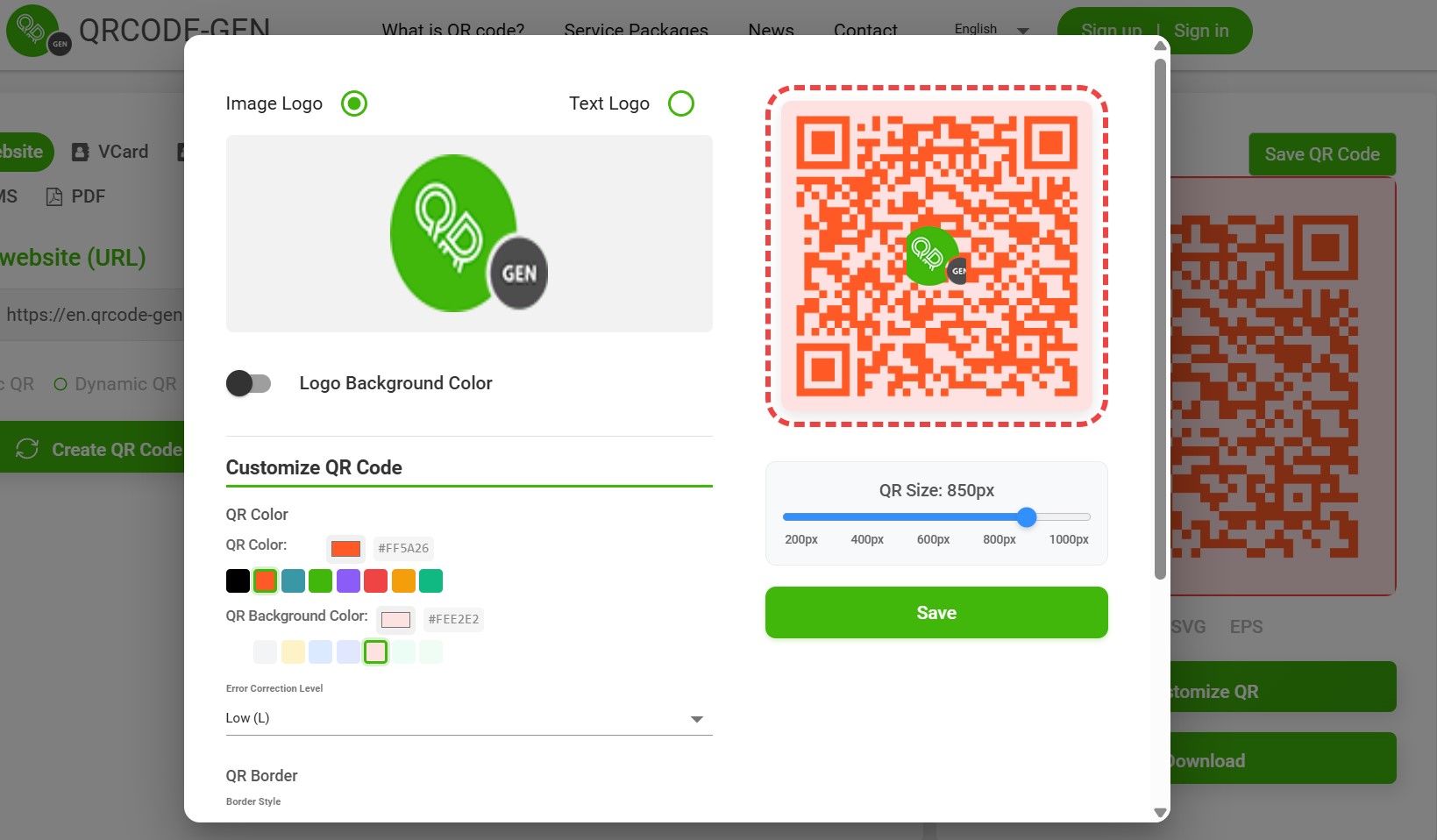
  • QR 코드 색상 변경(메인 색상, 배경)
     
  • 코너 스타일, 테두리 프레임 선택
     
  • 로고 추가” 또는 “로고 업로드” 모드 활성화
     

5단계: 로고 추가

  • "이미지 업로드" 선택
     
  • 로고를 PNG 또는 JPG 형식(투명 배경 권장)으로 업로드
     
  • 로고 크기를 조정하고 중앙에 배치
     

팁:

  • 로고는 정사각형이어야 왜곡이 없습니다
     
  • QR 코드가 쉽게 스캔될 수 있도록 로고 크기가 너무 크지 않게 하세요
     

6단계: QR 코드 다운로드

로고 추가 및 커스터마이즈를 완료한 후, 다음을 선택하세요:

  • PNG - 웹사이트나 SNS용
     
  • SVG - 고화질 인쇄용
     

로고가 있는 QR 코드를 효과적으로 사용하는 팁

1. 스캔이 쉬운지 확인

QR 코드가 아무리 예뻐도, 가장 중요한 것은 반드시 스캔이 가능해야 한다는 것입니다. 따라서:

  • 배경이 너무 밝거나 흐릿한 색상은 피하세요
     
  • 로고가 QR 코드 중앙 전체를 가리지 않도록 하세요
     
  • 생성 후 휴대폰으로 테스트하세요
     

2. 브랜드 아이덴티티와 통일성 유지

  • 로고/브랜드와 동일한 컬러톤 사용
     
  • {"props":{"pageProps":{"pathname":"/blog/instructions-on-how-to-add-a-brand-logo-to-a-qr-code-on-qrcode-gen-com-QQXK0R27","metadata":{"title":"qrcode-gen.com에서 QR 코드에 브랜드 로고를 추가하는 방법 안내 | QRCode GEN","description":"디지털 시대에는 브랜드가 모든 접점에서 돋보여야 사용자에게 강한 인상을 남길 수 있습니다. QR 코드는 웹사이트, 메뉴, 개인 프로필, 마케팅 캠페인 등 다양한 디지털 정보에 빠르게 연결할 수 있는 인기 도구가 되었습니다. 하지만 수많은 유사한 QR 코드들 사이에서, 어떻게 하...","keywords":"","language":"vi","alternates":{"canonical":"https://qrcode-gen.com/blog/instructions-on-how-to-add-a-brand-logo-to-a-qr-code-on-qrcode-gen-com-QQXK0R27","languages":{"vi":"https://qrcode-gen.com/blog/instructions-on-how-to-add-a-brand-logo-to-a-qr-code-on-qrcode-gen-com-QQXK0R27"},"xDefault":"https://qrcode-gen.com/blog/instructions-on-how-to-add-a-brand-logo-to-a-qr-code-on-qrcode-gen-com-QQXK0R27"},"openGraph":{"type":"article","url":"https://qrcode-gen.com/blog/instructions-on-how-to-add-a-brand-logo-to-a-qr-code-on-qrcode-gen-com-QQXK0R27","title":"qrcode-gen.com에서 QR 코드에 브랜드 로고를 추가하는 방법 안내 | QRCode GEN","description":"디지털 시대에는 브랜드가 모든 접점에서 돋보여야 사용자에게 강한 인상을 남길 수 있습니다. QR 코드는 웹사이트, 메뉴, 개인 프로필, 마케팅 캠페인 등 다양한 디지털 정보에 빠르게 연결할 수 있는 인기 도구가 되었습니다. 하지만 수많은 유사한 QR 코드들 사이에서, 어떻게 하...","images":["https://media.ninecode.vn/api/files/view?id=23FC057R"],"imageAlt":"qrcode-gen.com에서 QR 코드에 브랜드 로고를 추가하는 방법 안내 | QRCode GEN","locale":"vi_VN","siteName":"QR Code Generator"},"twitter":{"card":"summary_large_image","url":"https://qrcode-gen.com/blog/instructions-on-how-to-add-a-brand-logo-to-a-qr-code-on-qrcode-gen-com-QQXK0R27","title":"qrcode-gen.com에서 QR 코드에 브랜드 로고를 추가하는 방법 안내 | QRCode GEN","description":"디지털 시대에는 브랜드가 모든 접점에서 돋보여야 사용자에게 강한 인상을 남길 수 있습니다. QR 코드는 웹사이트, 메뉴, 개인 프로필, 마케팅 캠페인 등 다양한 디지털 정보에 빠르게 연결할 수 있는 인기 도구가 되었습니다. 하지만 수많은 유사한 QR 코드들 사이에서, 어떻게 하...","images":["https://media.ninecode.vn/api/files/view?id=23FC057R"],"site":"@qrcodegen"},"robots":{"index":true,"follow":true,"maxSnippet":-1,"maxImagePreview":"large","maxVideoPreview":-1},"other":{"og:site_name":"QR Code Generator","article:published_time":"2025-06-04T14:34:47.460Z","article:modified_time":"2025-06-04T14:34:47.460Z"},"jsonLd":[{"@context":"https://schema.org","@type":"Organization","name":"QR Code Gen","url":"https://qrcode-gen.com","logo":"https://qrcode-gen.com/logo.png"},{"@context":"https://schema.org","@type":"WebSite","name":"QR Code Gen","url":"https://qrcode-gen.com"},{"@context":"https://schema.org","@type":"Article","headline":"qrcode-gen.com에서 QR 코드에 브랜드 로고를 추가하는 방법 안내 | QRCode GEN","description":"디지털 시대에는 브랜드가 모든 접점에서 돋보여야 사용자에게 강한 인상을 남길 수 있습니다. QR 코드는 웹사이트, 메뉴, 개인 프로필, 마케팅 캠페인 등 다양한 디지털 정보에 빠르게 연결할 수 있는 인기 도구가 되었습니다. 하지만 수많은 유사한 QR 코드들 사이에서, 어떻게 하...","image":"https://media.ninecode.vn/api/files/view?id=23FC057R","author":{"@type":"Organization","name":"QR Code Gen"},"publisher":{"@type":"Organization","name":"QR Code Gen"},"mainEntityOfPage":{"@type":"WebPage","@id":"https://qrcode-gen.com/blog/instructions-on-how-to-add-a-brand-logo-to-a-qr-code-on-qrcode-gen-com-QQXK0R27"}},{"@context":"https://schema.org","@type":"BreadcrumbList","itemListElement":[{"@type":"ListItem","position":1,"name":"Home","item":"https://qrcode-gen.com/"},{"@type":"ListItem","position":2,"name":"Blog","item":"https://qrcode-gen.com/blog"},{"@type":"ListItem","position":3,"name":"instructions-on-how-to-add-a-brand-logo-to-a-qr-code-on-qrcode-gen-com-QQXK0R27","item":"https://qrcode-gen.com/blog/instructions-on-how-to-add-a-brand-logo-to-a-qr-code-on-qrcode-gen-com-QQXK0R27"}]}]},"serverContent":{"type":"blog-detail","title":"qrcode-gen.com에서 QR 코드에 브랜드 로고를 추가하는 방법 안내","createdAt":"2025-06-04T14:34:47.460Z","updatedAt":"","datePublishedIso":"2025-06-04T14:34:47.460Z","dateModifiedIso":"2025-06-04T14:34:47.460Z","briefContent":"\u003cp>\u003cspan style=\"font-size:11pt; font-variant:normal; white-space:pre-wrap\">\u003cspan style=\"font-family:Arial,sans-serif\">\u003cspan style=\"color:#000000\">\u003cspan style=\"font-weight:400\">\u003cspan style=\"font-style:normal\">\u003cspan style=\"text-decoration:none\">디지털 시대에는 브랜드가 모든 접점에서 돋보여야 사용자에게 강한 인상을 남길 수 있습니다. QR 코드는 웹사이트, 메뉴, 개인 프로필, 마케팅 캠페인 등 다양한 디지털 정보에 빠르게 연결할 수 있는 인기 도구가 되었습니다. 하지만 수많은 유사한 QR 코드들 사이에서, 어떻게 하면 브랜드가 진정으로 돋보이고 오래 기억에 남을 수 있을까요?\u003c/span>\u003c/span>\u003c/span>\u003c/span>\u003c/span>\u003c/span>\u003c/p>\n\n\u003cp> \u003c/p>\n\n\u003cp style=\"line-height:1.38; text-align:justify\">\u003cspan style=\"font-size:11pt; font-variant:normal; white-space:pre-wrap\">\u003cspan style=\"font-family:Arial,sans-serif\">\u003cspan style=\"color:#000000\">\u003cspan style=\"font-weight:400\">\u003cspan style=\"font-style:normal\">\u003cspan style=\"text-decoration:none\">핵심 솔루션은 모든 접점에서 브랜드 존재감을 높이는 것이며, 특히 브랜드 로고를 QR 코드에 직접 통합하는 것입니다. 로고가 QR 코드에 바로 표시되면, 고객이 스캔할 때마다 브랜드가 인식에 도달하여 인지도를 높이고 신뢰를 쌓는 데 도움이 됩니다. 제품 포장, 옥외광고, 포스터, 커뮤니케이션 자료 등 모든 기회를 최대한 활용해 브랜드가 고객의 모든 접점에 함께하도록 하세요.\u003c/span>\u003c/span>\u003c/span>\u003c/span>\u003c/span>\u003c/span>\u003c/p>\n\n\u003cp> \u003c/p>\n\n\u003cp style=\"line-height:1.38\">\u003cspan style=\"font-size:17pt; font-variant:normal; white-space:pre-wrap\">\u003cspan style=\"font-family:Arial,sans-serif\">\u003cspan style=\"color:#000000\">\u003cspan style=\"font-weight:700\">\u003cspan style=\"font-style:normal\">\u003cspan style=\"text-decoration:none\">왜 QR 코드에 로고를 추가해야 할까요?\u003c/span>\u003c/span>\u003c/span>\u003c/span>\u003c/span>\u003c/span>\u003c/p>\n\n\u003ch3 style=\"line-height:1.38; margin-top:19px; margin-bottom:5px\">\u003cspan style=\"font-size:13pt; font-variant:normal; white-space:pre-wrap\">\u003cspan style=\"font-family:Arial,sans-serif\">\u003cspan style=\"color:#000000\">\u003cspan style=\"font-weight:700\">\u003cspan style=\"font-style:normal\">\u003cspan style=\"text-decoration:none\">1. 브랜드 인지도 향상\u003c/span>\u003c/span>\u003c/span>\u003c/span>\u003c/span>\u003c/span>\u003c/h3>\n\n\u003cp style=\"line-height:1.38; margin-top:16px; margin-bottom:16px\">\u003cspan style=\"font-size:11pt; font-variant:normal; white-space:pre-wrap\">\u003cspan style=\"font-family:Arial,sans-serif\">\u003cspan style=\"color:#000000\">\u003cspan style=\"font-weight:400\">\u003cspan style=\"font-style:normal\">\u003cspan style=\"text-decoration:none\">일반적인 QR 코드는 단순한 흑백 사각형의 집합일 뿐입니다. 하지만 QR 코드 중앙에 로고를 삽입하면 고객은 \u003c/span>\u003c/span>\u003c/span>\u003c/span>\u003c/span>\u003c/span>\u003cspan style=\"font-size:11pt; font-variant:normal; white-space:pre-wrap\">\u003cspan style=\"font-family:Arial,sans-serif\">\u003cspan style=\"color:#000000\">\u003cspan style=\"font-weight:700\">\u003cspan style=\"font-style:normal\">\u003cspan style=\"text-decoration:none\">스캔하기 전에 즉시 브랜드를 인식\u003c/span>\u003c/span>\u003c/span>\u003c/span>\u003c/span>\u003c/span>\u003cspan style=\"font-size:11pt; font-variant:normal; white-space:pre-wrap\">\u003cspan style=\"font-family:Arial,sans-serif\">\u003cspan style=\"color:#000000\">\u003cspan style=\"font-weight:400\">\u003cspan style=\"font-style:normal\">\u003cspan style=\"text-decoration:none\">할 수 있습니다. 이는 다음과 같은 간단한 방법입니다:\u003c/span>\u003c/span>\u003c/span>\u003c/span>\u003c/span>\u003c/span>\u003c/p>\n\n\u003cul>\n\t\u003cli aria-level=\"1\" style=\"list-style-type:disc\">\u003cspan style=\"font-size:11pt; font-variant:normal; white-space:pre-wrap\">\u003cspan style=\"font-family:Arial,sans-serif\">\u003cspan style=\"color:#000000\">\u003cspan style=\"font-weight:400\">\u003cspan style=\"font-style:normal\">\u003cspan style=\"text-decoration:none\">첫눈에 강한 인상을 남길 수 있습니다\u003c/span>\u003c/span>\u003c/span>\u003c/span>\u003c/span>\u003c/span>\u003cbr />\n\t \u003c/li>\n\t\u003cli aria-level=\"1\" style=\"list-style-type:disc\">\u003cspan style=\"font-size:11pt; font-variant:normal; white-space:pre-wrap\">\u003cspan style=\"font-family:Arial,sans-serif\">\u003cspan style=\"color:#000000\">\u003cspan style=\"font-weight:400\">\u003cspan style=\"font-style:normal\">\u003cspan style=\"text-decoration:none\">고객이 로고와 브랜드 이미지를 기억하도록 돕습니다\u003c/span>\u003c/span>\u003c/span>\u003c/span>\u003c/span>\u003c/span>\u003cbr />\n\t \u003c/li>\n\t\u003cli aria-level=\"1\" style=\"list-style-type:disc\">\u003cspan style=\"font-size:11pt; font-variant:normal; white-space:pre-wrap\">\u003cspan style=\"font-family:Arial,sans-serif\">\u003cspan style=\"color:#000000\">\u003cspan style=\"font-weight:400\">\u003cspan style=\"font-style:normal\">\u003cspan style=\"text-decoration:none\">파트너와 고객에게 전문성을 높여줍니다\u003c/span>\u003c/span>\u003c/span>\u003c/span>\u003c/span>\u003c/span>\u003cbr />\n\t \u003c/li>\n\u003c/ul>\n\n\u003ch3 style=\"line-height:1.38; margin-top:19px; margin-bottom:5px\">\u003cspan style=\"font-size:13pt; font-variant:normal; white-space:pre-wrap\">\u003cspan style=\"font-family:Arial,sans-serif\">\u003cspan style=\"color:#000000\">\u003cspan style=\"font-weight:700\">\u003cspan style=\"font-style:normal\">\u003cspan style=\"text-decoration:none\">2. 신뢰도 향상 – 스캔 시 망설임 감소\u003c/span>\u003c/span>\u003c/span>\u003c/span>\u003c/span>\u003c/span>\u003c/h3>\n\n\u003cp style=\"line-height:1.38; margin-top:16px; margin-bottom:16px\">\u003cspan style=\"font-size:11pt; font-variant:normal; white-space:pre-wrap\">\u003cspan style=\"font-family:Arial,sans-serif\">\u003cspan style=\"color:#000000\">\u003cspan style=\"font-weight:400\">\u003cspan style=\"font-style:normal\">\u003cspan style=\"text-decoration:none\">사용자들은 출처가 불분명한 QR 코드를 마주할 때 종종 망설입니다. 코드 중앙에 로고를 표시하면 고객이 QR 코드가 어디로 연결되는지(예: 레스토랑 메뉴, 회사 웹사이트 등)를 명확히 알 수 있어, 특히 마케팅 캠페인에서 스캔할 때 더 안심할 수 있습니다.\u003c/span>\u003c/span>\u003c/span>\u003c/span>\u003c/span>\u003c/span>\u003cbr />\n \u003c/p>\n\n\u003ch3 style=\"line-height:1.38; margin-top:19px; margin-bottom:5px\">\u003cspan style=\"font-size:13pt; font-variant:normal; white-space:pre-wrap\">\u003cspan style=\"font-family:Arial,sans-serif\">\u003cspan style=\"color:#000000\">\u003cspan style=\"font-weight:700\">\u003cspan style=\"font-style:normal\">\u003cspan style=\"text-decoration:none\">3. 더 개성 있고 미적임\u003c/span>\u003c/span>\u003c/span>\u003c/span>\u003c/span>\u003c/span>\u003c/h3>\n\n\u003cp style=\"line-height:1.38; margin-top:16px; margin-bottom:16px\">\u003cspan style=\"font-size:11pt; font-variant:normal; white-space:pre-wrap\">\u003cspan style=\"font-family:Arial,sans-serif\">\u003cspan style=\"color:#000000\">\u003cspan style=\"font-weight:400\">\u003cspan style=\"font-style:normal\">\u003cspan style=\"text-decoration:none\">로고가 들어간 QR 코드는 \u003c/span>\u003c/span>\u003c/span>\u003c/span>\u003c/span>\u003c/span>\u003cspan style=\"font-size:11pt; font-variant:normal; white-space:pre-wrap\">\u003cspan style=\"font-family:Arial,sans-serif\">\u003cspan style=\"color:#000000\">\u003cspan style=\"font-weight:700\">\u003cspan style=\"font-style:normal\">\u003cspan style=\"text-decoration:none\">전문적이고 미적\u003c/span>\u003c/span>\u003c/span>\u003c/span>\u003c/span>\u003c/span>\u003cspan style=\"font-size:11pt; font-variant:normal; white-space:pre-wrap\">\u003cspan style=\"font-family:Arial,sans-serif\">\u003cspan style=\"color:#000000\">\u003cspan style=\"font-weight:400\">\u003cspan style=\"font-style:normal\">\u003cspan style=\"text-decoration:none\">이며, 브랜드 아이덴티티와 잘 어울립니다. 명함, 제품 포장, 스탠디/광고, 이벤트 랜딩 페이지 등에 사용할 때 큰 장점이 됩니다.\u003c/span>\u003c/span>\u003c/span>\u003c/span>\u003c/span>\u003c/span>\u003cbr />\n \u003c/p>\n\n\u003cp style=\"line-height:1.38\">\u003cspan style=\"font-size:17pt; font-variant:normal; white-space:pre-wrap\">\u003cspan style=\"font-family:Arial,sans-serif\">\u003cspan style=\"color:#000000\">\u003cspan style=\"font-weight:700\">\u003cspan style=\"font-style:normal\">\u003cspan style=\"text-decoration:none\">qrcode-gen.com에서 로고가 있는 QR 코드 만들기\u003c/span>\u003c/span>\u003c/span>\u003c/span>\u003c/span>\u003c/span>\u003c/p>\n\n\u003ch3 style=\"line-height:1.38; margin-top:19px; margin-bottom:5px\">\u003cspan style=\"font-size:13pt; font-variant:normal; white-space:pre-wrap\">\u003cspan style=\"font-family:Arial,sans-serif\">\u003cspan style=\"color:#000000\">\u003cspan style=\"font-weight:700\">\u003cspan style=\"font-style:normal\">\u003cspan style=\"text-decoration:none\">1단계: qrcode-gen.com 플랫폼 접속\u003c/span>\u003c/span>\u003c/span>\u003c/span>\u003c/span>\u003c/span>\u003c/h3>\n\n\u003cp style=\"line-height:1.38; margin-top:16px; margin-bottom:16px\">\u003cspan style=\"font-size:11pt; font-variant:normal; white-space:pre-wrap\">\u003cspan style=\"font-family:Arial,sans-serif\">\u003cspan style=\"color:#000000\">\u003cspan style=\"font-weight:400\">\u003cspan style=\"font-style:normal\">\u003cspan style=\"text-decoration:none\">공식 웹사이트에 접속하세요:\u003c/span>\u003c/span>\u003c/span>\u003c/span>\u003c/span>\u003c/span>\u003ca href=\"https://qrcode-gen.com\" style=\"text-decoration:none\">\u003cspan style=\"font-size:11pt; font-variant:normal; white-space:pre-wrap\">\u003cspan style=\"font-family:Arial,sans-serif\">\u003cspan style=\"color:#000000\">\u003cspan style=\"font-weight:400\">\u003cspan style=\"font-style:normal\">\u003cspan style=\"text-decoration:none\"> \u003c/span>\u003c/span>\u003c/span>\u003c/span>\u003c/span>\u003c/span>\u003cspan style=\"font-size:11pt; font-variant:normal; white-space:pre-wrap\">\u003cspan style=\"font-family:Arial,sans-serif\">\u003cspan style=\"color:#1155cc\">\u003cspan style=\"font-weight:400\">\u003cspan style=\"font-style:normal\">\u003cspan style=\"text-decoration:underline\">\u003cspan style=\"-webkit-text-decoration-skip:none\">\u003cspan style=\"text-decoration-skip-ink:none\">https://qrcode-gen.com\u003c/span>\u003c/span>\u003c/span>\u003c/span>\u003c/span>\u003c/span>\u003c/span>\u003c/span>\u003c/a>\u003c/p>\n\n\u003cp style=\"line-height:1.38; margin-top:16px; margin-bottom:16px\">\u003cspan style=\"font-size:11pt; font-variant:normal; white-space:pre-wrap\">\u003cspan style=\"font-family:Arial,sans-serif\">\u003cspan style=\"color:#000000\">\u003cspan style=\"font-weight:400\">\u003cspan style=\"font-style:normal\">\u003cspan style=\"text-decoration:none\">이 사이트는 무료 QR 코드 생성기 중 하나로, 회원가입 없이도 쉽게 로고 삽입 기능을 지원합니다.\u003c/span>\u003c/span>\u003c/span>\u003c/span>\u003c/span>\u003c/span>\u003c/p>\n\n\u003ch3 style=\"line-height:1.38; margin-top:19px; margin-bottom:5px\">\u003cspan style=\"font-size:13pt; font-variant:normal; white-space:pre-wrap\">\u003cspan style=\"font-family:Arial,sans-serif\">\u003cspan style=\"color:#000000\">\u003cspan style=\"font-weight:700\">\u003cspan style=\"font-style:normal\">\u003cspan style=\"text-decoration:none\">2단계: 생성할 QR 코드 유형 선택\u003c/span>\u003c/span>\u003c/span>\u003c/span>\u003c/span>\u003c/span>\u003c/h3>\n\n\u003cp style=\"line-height:1.38; margin-top:16px; margin-bottom:16px\">\u003cspan style=\"font-size:11pt; font-variant:normal; white-space:pre-wrap\">\u003cspan style=\"font-family:Arial,sans-serif\">\u003cspan style=\"color:#000000\">\u003cspan style=\"font-weight:400\">\u003cspan style=\"font-style:normal\">\u003cspan style=\"text-decoration:none\">메인 화면에서 다양한 옵션을 볼 수 있습니다:\u003c/span>\u003c/span>\u003c/span>\u003c/span>\u003c/span>\u003c/span>\u003c/p>\n\n\u003cul>\n\t\u003cli aria-level=\"1\" style=\"list-style-type:disc\">\u003cspan style=\"font-size:11pt; font-variant:normal; white-space:pre-wrap\">\u003cspan style=\"font-family:Arial,sans-serif\">\u003cspan style=\"color:#000000\">\u003cspan style=\"font-weight:400\">\u003cspan style=\"font-style:normal\">\u003cspan style=\"text-decoration:none\">URL\u003c/span>\u003c/span>\u003c/span>\u003c/span>\u003c/span>\u003c/span>\u003c/li>\n\t\u003cli aria-level=\"1\" style=\"list-style-type:disc\">\u003cspan style=\"font-size:11pt; font-variant:normal; white-space:pre-wrap\">\u003cspan style=\"font-family:Arial,sans-serif\">\u003cspan style=\"color:#000000\">\u003cspan style=\"font-weight:400\">\u003cspan style=\"font-style:normal\">\u003cspan style=\"text-decoration:none\">vCard\u003c/span>\u003c/span>\u003c/span>\u003c/span>\u003c/span>\u003c/span>\u003c/li>\n\t\u003cli aria-level=\"1\" style=\"list-style-type:disc\">\u003cspan style=\"font-size:11pt; font-variant:normal; white-space:pre-wrap\">\u003cspan style=\"font-family:Arial,sans-serif\">\u003cspan style=\"color:#000000\">\u003cspan style=\"font-weight:400\">\u003cspan style=\"font-style:normal\">\u003cspan style=\"text-decoration:none\">vCard Online\u003c/span>\u003c/span>\u003c/span>\u003c/span>\u003c/span>\u003c/span>\u003c/li>\n\t\u003cli aria-level=\"1\" style=\"list-style-type:disc\">\u003cspan style=\"font-size:11pt; font-variant:normal; white-space:pre-wrap\">\u003cspan style=\"font-family:Arial,sans-serif\">\u003cspan style=\"color:#000000\">\u003cspan style=\"font-weight:400\">\u003cspan style=\"font-style:normal\">\u003cspan style=\"text-decoration:none\">Text\u003c/span>\u003c/span>\u003c/span>\u003c/span>\u003c/span>\u003c/span>\u003c/li>\n\t\u003cli aria-level=\"1\" style=\"list-style-type:disc\">\u003cspan style=\"font-size:11pt; font-variant:normal; white-space:pre-wrap\">\u003cspan style=\"font-family:Arial,sans-serif\">\u003cspan style=\"color:#000000\">\u003cspan style=\"font-weight:400\">\u003cspan style=\"font-style:normal\">\u003cspan style=\"text-decoration:none\">Email\u003c/span>\u003c/span>\u003c/span>\u003c/span>\u003c/span>\u003c/span>\u003c/li>\n\t\u003cli aria-level=\"1\" style=\"list-style-type:disc\">\u003cspan style=\"font-size:11pt; font-variant:normal; white-space:pre-wrap\">\u003cspan style=\"font-family:Arial,sans-serif\">\u003cspan style=\"color:#000000\">\u003cspan style=\"font-weight:400\">\u003cspan style=\"font-style:normal\">\u003cspan style=\"text-decoration:none\">Facebook\u003c/span>\u003c/span>\u003c/span>\u003c/span>\u003c/span>\u003c/span>\u003c/li>\n\t\u003cli aria-level=\"1\" style=\"list-style-type:disc\">\u003cspan style=\"font-size:11pt; font-variant:normal; white-space:pre-wrap\">\u003cspan style=\"font-family:Arial,sans-serif\">\u003cspan style=\"color:#000000\">\u003cspan style=\"font-weight:400\">\u003cspan style=\"font-style:normal\">\u003cspan style=\"text-decoration:none\">WiFi\u003c/span>\u003c/span>\u003c/span>\u003c/span>\u003c/span>\u003c/span>\u003c/li>\n\t\u003cli aria-level=\"1\" style=\"list-style-type:disc\">\u003cspan style=\"font-size:11pt; font-variant:normal; white-space:pre-wrap\">\u003cspan style=\"font-family:Arial,sans-serif\">\u003cspan style=\"color:#000000\">\u003cspan style=\"font-weight:400\">\u003cspan style=\"font-style:normal\">\u003cspan style=\"text-decoration:none\">Phone\u003c/span>\u003c/span>\u003c/span>\u003c/span>\u003c/span>\u003c/span>\u003c/li>\n\t\u003cli aria-level=\"1\" style=\"list-style-type:disc\">\u003cspan style=\"font-size:11pt; font-variant:normal; white-space:pre-wrap\">\u003cspan style=\"font-family:Arial,sans-serif\">\u003cspan style=\"color:#000000\">\u003cspan style=\"font-weight:400\">\u003cspan style=\"font-style:normal\">\u003cspan style=\"text-decoration:none\">SMS\u003c/span>\u003c/span>\u003c/span>\u003c/span>\u003c/span>\u003c/span>\u003c/li>\n\t\u003cli aria-level=\"1\" style=\"list-style-type:disc\">\u003cspan style=\"font-size:11pt; font-variant:normal; white-space:pre-wrap\">\u003cspan style=\"font-family:Arial,sans-serif\">\u003cspan style=\"color:#000000\">\u003cspan style=\"font-weight:400\">\u003cspan style=\"font-style:normal\">\u003cspan style=\"text-decoration:none\">PDF\u003c/span>\u003c/span>\u003c/span>\u003c/span>\u003c/span>\u003c/span>\u003cbr />\n\t \u003c/li>\n\u003c/ul>\n\n\u003cp style=\"line-height:1.65; background-color:#ffffff; margin-top:11px; padding:0pt 0pt 21pt 0pt\">\u003cspan style=\"font-size:12pt; font-variant:normal; white-space:pre-wrap\">\u003cspan style=\"font-family:Arial,sans-serif\">\u003cspan style=\"color:#001d35\">\u003cspan style=\"font-weight:400\">\u003cspan style=\"font-style:normal\">\u003cspan style=\"text-decoration:none\">QR 코드가 표시할 형식을 선택하고, 박스에 링크를 입력하세요.\u003c/span>\u003c/span>\u003c/span>\u003c/span>\u003c/span>\u003c/span>\u003c/p>\n\n\u003cp>\u003cimg alt=\"\" src=\"https://media.ninecode.vn/api/files/view?id=VBMC77QQ\" style=\"width: 1783px; height: 834px;\" decoding=\"async\" loading=\"eager\" fetchpriority=\"high\"/>\u003c/p>\n\n\u003ch3 style=\"line-height:1.38; margin-top:19px; margin-bottom:5px\">\u003cspan style=\"font-size:13pt; font-variant:normal; white-space:pre-wrap\">\u003cspan style=\"font-family:Arial,sans-serif\">\u003cspan style=\"color:#000000\">\u003cspan style=\"font-weight:700\">\u003cspan style=\"font-style:normal\">\u003cspan style=\"text-decoration:none\">3단계: 링크 입력 후 “QR 코드 생성” 선택\u003c/span>\u003c/span>\u003c/span>\u003c/span>\u003c/span>\u003c/span>\u003c/h3>\n\n\u003cp style=\"line-height:1.38; margin-top:16px; margin-bottom:16px\">\u003cspan style=\"font-size:11pt; font-variant:normal; white-space:pre-wrap\">\u003cspan style=\"font-family:Arial,sans-serif\">\u003cspan style=\"color:#000000\">\u003cspan style=\"font-weight:400\">\u003cspan style=\"font-style:normal\">\u003cspan style=\"text-decoration:none\">필요한 박스에 링크나 내용을 입력 → “\u003c/span>\u003c/span>\u003c/span>\u003c/span>\u003c/span>\u003c/span>\u003cspan style=\"font-size:13pt; font-variant:normal; white-space:pre-wrap\">\u003cspan style=\"font-family:Arial,sans-serif\">\u003cspan style=\"color:#000000\">\u003cspan style=\"font-weight:400\">\u003cspan style=\"font-style:normal\">\u003cspan style=\"text-decoration:none\">Create \u003c/span>\u003c/span>\u003c/span>\u003c/span>\u003c/span>\u003c/span>\u003cspan style=\"font-size:11pt; font-variant:normal; white-space:pre-wrap\">\u003cspan style=\"font-family:Arial,sans-serif\">\u003cspan style=\"color:#000000\">\u003cspan style=\"font-weight:400\">\u003cspan style=\"font-style:normal\">\u003cspan style=\"text-decoration:none\">QR Code” 버튼을 클릭하세요.\u003c/span>\u003c/span>\u003c/span>\u003c/span>\u003c/span>\u003c/span>\u003c/p>\n\n\u003cp style=\"line-height:1.38; margin-top:16px; margin-bottom:16px\">\u003cspan style=\"font-size:11pt; font-variant:normal; white-space:pre-wrap\">\u003cspan style=\"font-family:Arial,sans-serif\">\u003cspan style=\"color:#000000\">\u003cspan style=\"font-weight:400\">\u003cspan style=\"font-style:normal\">\u003cspan style=\"text-decoration:none\">즉시 원본 QR 코드(로고 없음)가 생성됩니다.\u003c/span>\u003c/span>\u003c/span>\u003c/span>\u003c/span>\u003c/span>\u003c/p>\n\n\u003cp> \u003c/p>\n\n\u003ch3 style=\"line-height:1.38; margin-top:19px; margin-bottom:5px\">\u003cspan style=\"font-size:13pt; font-variant:normal; white-space:pre-wrap\">\u003cspan style=\"font-family:Arial,sans-serif\">\u003cspan style=\"color:#000000\">\u003cspan style=\"font-weight:700\">\u003cspan style=\"font-style:normal\">\u003cspan style=\"text-decoration:none\">4단계: QR 코드 커스터마이즈\u003c/span>\u003c/span>\u003c/span>\u003c/span>\u003c/span>\u003c/span>\u003c/h3>\n\n\u003cp style=\"line-height:1.38; margin-top:16px; margin-bottom:16px\">\u003cspan style=\"font-size:11pt; font-variant:normal; white-space:pre-wrap\">\u003cspan style=\"font-family:Arial,sans-serif\">\u003cspan style=\"color:#000000\">\u003cspan style=\"font-weight:400\">\u003cspan style=\"font-style:normal\">\u003cspan style=\"text-decoration:none\">이 단계에서 다음을 할 수 있습니다:\u003c/span>\u003c/span>\u003c/span>\u003c/span>\u003c/span>\u003c/span>\u003c/p>\n\n\u003cul>\n\t\u003cli aria-level=\"1\" style=\"list-style-type:disc\">\u003cspan style=\"font-size:11pt; font-variant:normal; white-space:pre-wrap\">\u003cspan style=\"font-family:Arial,sans-serif\">\u003cspan style=\"color:#000000\">\u003cspan style=\"font-weight:700\">\u003cspan style=\"font-style:normal\">\u003cspan style=\"text-decoration:none\">QR 코드 색상 변경\u003c/span>\u003c/span>\u003c/span>\u003c/span>\u003c/span>\u003c/span>\u003cspan style=\"font-size:11pt; font-variant:normal; white-space:pre-wrap\">\u003cspan style=\"font-family:Arial,sans-serif\">\u003cspan style=\"color:#000000\">\u003cspan style=\"font-weight:400\">\u003cspan style=\"font-style:normal\">\u003cspan style=\"text-decoration:none\">(메인 색상, 배경)\u003c/span>\u003c/span>\u003c/span>\u003c/span>\u003c/span>\u003c/span>\u003cbr />\n\t \u003c/li>\n\t\u003cli aria-level=\"1\" style=\"list-style-type:disc\">\u003cspan style=\"font-size:11pt; font-variant:normal; white-space:pre-wrap\">\u003cspan style=\"font-family:Arial,sans-serif\">\u003cspan style=\"color:#000000\">\u003cspan style=\"font-weight:400\">\u003cspan style=\"font-style:normal\">\u003cspan style=\"text-decoration:none\">코너 스타일, 테두리 프레임 선택\u003c/span>\u003c/span>\u003c/span>\u003c/span>\u003c/span>\u003c/span>\u003cbr />\n\t \u003c/li>\n\t\u003cli aria-level=\"1\" style=\"list-style-type:disc\">\u003cspan style=\"font-size:11pt; font-variant:normal; white-space:pre-wrap\">\u003cspan style=\"font-family:Arial,sans-serif\">\u003cspan style=\"color:#000000\">\u003cspan style=\"font-weight:400\">\u003cspan style=\"font-style:normal\">\u003cspan style=\"text-decoration:none\">“\u003c/span>\u003c/span>\u003c/span>\u003c/span>\u003c/span>\u003c/span>\u003cspan style=\"font-size:11pt; font-variant:normal; white-space:pre-wrap\">\u003cspan style=\"font-family:Arial,sans-serif\">\u003cspan style=\"color:#000000\">\u003cspan style=\"font-weight:700\">\u003cspan style=\"font-style:normal\">\u003cspan style=\"text-decoration:none\">로고 추가\u003c/span>\u003c/span>\u003c/span>\u003c/span>\u003c/span>\u003c/span>\u003cspan style=\"font-size:11pt; font-variant:normal; white-space:pre-wrap\">\u003cspan style=\"font-family:Arial,sans-serif\">\u003cspan style=\"color:#000000\">\u003cspan style=\"font-weight:400\">\u003cspan style=\"font-style:normal\">\u003cspan style=\"text-decoration:none\">” 또는 “\u003c/span>\u003c/span>\u003c/span>\u003c/span>\u003c/span>\u003c/span>\u003cspan style=\"font-size:11pt; font-variant:normal; white-space:pre-wrap\">\u003cspan style=\"font-family:Arial,sans-serif\">\u003cspan style=\"color:#000000\">\u003cspan style=\"font-weight:700\">\u003cspan style=\"font-style:normal\">\u003cspan style=\"text-decoration:none\">로고 업로드\u003c/span>\u003c/span>\u003c/span>\u003c/span>\u003c/span>\u003c/span>\u003cspan style=\"font-size:11pt; font-variant:normal; white-space:pre-wrap\">\u003cspan style=\"font-family:Arial,sans-serif\">\u003cspan style=\"color:#000000\">\u003cspan style=\"font-weight:400\">\u003cspan style=\"font-style:normal\">\u003cspan style=\"text-decoration:none\">” 모드 활성화\u003c/span>\u003c/span>\u003c/span>\u003c/span>\u003c/span>\u003c/span>\u003cbr />\n\t \u003c/li>\n\u003c/ul>\n\n\u003ch3 style=\"line-height:1.38; margin-top:19px; margin-bottom:5px\">\u003cspan style=\"font-size:13pt; font-variant:normal; white-space:pre-wrap\">\u003cspan style=\"font-family:Arial,sans-serif\">\u003cspan style=\"color:#000000\">\u003cspan style=\"font-weight:700\">\u003cspan style=\"font-style:normal\">\u003cspan style=\"text-decoration:none\">5단계: 로고 추가\u003c/span>\u003c/span>\u003c/span>\u003c/span>\u003c/span>\u003c/span>\u003c/h3>\n\n\u003cul>\n\t\u003cli aria-level=\"1\" style=\"list-style-type:disc\">\u003cspan style=\"font-size:11pt; font-variant:normal; white-space:pre-wrap\">\u003cspan style=\"font-family:Arial,sans-serif\">\u003cspan style=\"color:#000000\">\u003cspan style=\"font-weight:400\">\u003cspan style=\"font-style:normal\">\u003cspan style=\"text-decoration:none\">\"이미지 업로드\" 선택\u003c/span>\u003c/span>\u003c/span>\u003c/span>\u003c/span>\u003c/span>\u003cbr />\n\t \u003c/li>\n\t\u003cli aria-level=\"1\" style=\"list-style-type:disc\">\u003cspan style=\"font-size:11pt; font-variant:normal; white-space:pre-wrap\">\u003cspan style=\"font-family:Arial,sans-serif\">\u003cspan style=\"color:#000000\">\u003cspan style=\"font-weight:400\">\u003cspan style=\"font-style:normal\">\u003cspan style=\"text-decoration:none\">로고를 PNG 또는 JPG 형식(투명 배경 권장)으로 업로드\u003c/span>\u003c/span>\u003c/span>\u003c/span>\u003c/span>\u003c/span>\u003cbr />\n\t \u003c/li>\n\t\u003cli aria-level=\"1\" style=\"list-style-type:disc\">\u003cspan style=\"font-size:11pt; font-variant:normal; white-space:pre-wrap\">\u003cspan style=\"font-family:Arial,sans-serif\">\u003cspan style=\"color:#000000\">\u003cspan style=\"font-weight:400\">\u003cspan style=\"font-style:normal\">\u003cspan style=\"text-decoration:none\">로고 크기를 조정하고 중앙에 배치\u003c/span>\u003c/span>\u003c/span>\u003c/span>\u003c/span>\u003c/span>\u003cbr />\n\t \u003c/li>\n\u003c/ul>\n\n\u003cp style=\"line-height:1.38; margin-top:16px; margin-bottom:16px\">\u003cimg alt=\"\" src=\"https://media.ninecode.vn/api/files/view?id=GFXTN5D5\" style=\"width: 1639px; height: 958px;\" decoding=\"async\" loading=\"lazy\"/>\u003c/p>\n\n\u003cp style=\"line-height:1.38; margin-top:16px; margin-bottom:16px\">\u003cspan style=\"font-size:11pt; font-variant:normal; white-space:pre-wrap\">\u003cspan style=\"font-family:Arial,sans-serif\">\u003cspan style=\"color:#000000\">\u003cspan style=\"font-weight:400\">\u003cspan style=\"font-style:normal\">\u003cspan style=\"text-decoration:none\">팁:\u003c/span>\u003c/span>\u003c/span>\u003c/span>\u003c/span>\u003c/span>\u003c/p>\n\n\u003cul>\n\t\u003cli aria-level=\"1\" style=\"list-style-type:disc\">\u003cspan style=\"font-size:11pt; font-variant:normal; white-space:pre-wrap\">\u003cspan style=\"font-family:Arial,sans-serif\">\u003cspan style=\"color:#000000\">\u003cspan style=\"font-weight:700\">\u003cspan style=\"font-style:normal\">\u003cspan style=\"text-decoration:none\">로고는 정사각형\u003c/span>\u003c/span>\u003c/span>\u003c/span>\u003c/span>\u003c/span>\u003cspan style=\"font-size:11pt; font-variant:normal; white-space:pre-wrap\">\u003cspan style=\"font-family:Arial,sans-serif\">\u003cspan style=\"color:#000000\">\u003cspan style=\"font-weight:400\">\u003cspan style=\"font-style:normal\">\u003cspan style=\"text-decoration:none\">이어야 왜곡이 없습니다\u003c/span>\u003c/span>\u003c/span>\u003c/span>\u003c/span>\u003c/span>\u003cbr />\n\t \u003c/li>\n\t\u003cli aria-level=\"1\" style=\"list-style-type:disc\">\u003cspan style=\"font-size:11pt; font-variant:normal; white-space:pre-wrap\">\u003cspan style=\"font-family:Arial,sans-serif\">\u003cspan style=\"color:#000000\">\u003cspan style=\"font-weight:400\">\u003cspan style=\"font-style:normal\">\u003cspan style=\"text-decoration:none\">QR 코드가 쉽게 스캔될 수 있도록 로고 크기가 너무 크지 않게 하세요\u003c/span>\u003c/span>\u003c/span>\u003c/span>\u003c/span>\u003c/span>\u003cbr />\n\t \u003c/li>\n\u003c/ul>\n\n\u003ch3 style=\"line-height:1.38; margin-top:19px; margin-bottom:5px\">\u003cspan style=\"font-size:13pt; font-variant:normal; white-space:pre-wrap\">\u003cspan style=\"font-family:Arial,sans-serif\">\u003cspan style=\"color:#000000\">\u003cspan style=\"font-weight:700\">\u003cspan style=\"font-style:normal\">\u003cspan style=\"text-decoration:none\">6단계: QR 코드 다운로드\u003c/span>\u003c/span>\u003c/span>\u003c/span>\u003c/span>\u003c/span>\u003c/h3>\n\n\u003cp style=\"line-height:1.38; margin-top:16px; margin-bottom:16px\">\u003cspan style=\"font-size:11pt; font-variant:normal; white-space:pre-wrap\">\u003cspan style=\"font-family:Arial,sans-serif\">\u003cspan style=\"color:#000000\">\u003cspan style=\"font-weight:400\">\u003cspan style=\"font-style:normal\">\u003cspan style=\"text-decoration:none\">로고 추가 및 커스터마이즈를 완료한 후, 다음을 선택하세요:\u003c/span>\u003c/span>\u003c/span>\u003c/span>\u003c/span>\u003c/span>\u003c/p>\n\n\u003cul>\n\t\u003cli aria-level=\"1\" style=\"list-style-type:disc\">\u003cspan style=\"font-size:11pt; font-variant:normal; white-space:pre-wrap\">\u003cspan style=\"font-family:Arial,sans-serif\">\u003cspan style=\"color:#000000\">\u003cspan style=\"font-weight:700\">\u003cspan style=\"font-style:normal\">\u003cspan style=\"text-decoration:none\">PNG\u003c/span>\u003c/span>\u003c/span>\u003c/span>\u003c/span>\u003c/span>\u003cspan style=\"font-size:11pt; font-variant:normal; white-space:pre-wrap\">\u003cspan style=\"font-family:Arial,sans-serif\">\u003cspan style=\"color:#000000\">\u003cspan style=\"font-weight:400\">\u003cspan style=\"font-style:normal\">\u003cspan style=\"text-decoration:none\"> - 웹사이트나 SNS용\u003c/span>\u003c/span>\u003c/span>\u003c/span>\u003c/span>\u003c/span>\u003cbr />\n\t \u003c/li>\n\t\u003cli aria-level=\"1\" style=\"list-style-type:disc\">\u003cspan style=\"font-size:11pt; font-variant:normal; white-space:pre-wrap\">\u003cspan style=\"font-family:Arial,sans-serif\">\u003cspan style=\"color:#000000\">\u003cspan style=\"font-weight:700\">\u003cspan style=\"font-style:normal\">\u003cspan style=\"text-decoration:none\">SVG\u003c/span>\u003c/span>\u003c/span>\u003c/span>\u003c/span>\u003c/span>\u003cspan style=\"font-size:11pt; font-variant:normal; white-space:pre-wrap\">\u003cspan style=\"font-family:Arial,sans-serif\">\u003cspan style=\"color:#000000\">\u003cspan style=\"font-weight:400\">\u003cspan style=\"font-style:normal\">\u003cspan style=\"text-decoration:none\"> - 고화질 인쇄용\u003c/span>\u003c/span>\u003c/span>\u003c/span>\u003c/span>\u003c/span>\u003cbr />\n\t \u003c/li>\n\u003c/ul>\n\n\u003cp style=\"line-height:1.38\">\u003cspan style=\"font-size:17pt; font-variant:normal; white-space:pre-wrap\">\u003cspan style=\"font-family:Arial,sans-serif\">\u003cspan style=\"color:#000000\">\u003cspan style=\"font-weight:700\">\u003cspan style=\"font-style:normal\">\u003cspan style=\"text-decoration:none\">로고가 있는 QR 코드를 효과적으로 사용하는 팁\u003c/span>\u003c/span>\u003c/span>\u003c/span>\u003c/span>\u003c/span>\u003c/p>\n\n\u003ch3 style=\"line-height:1.38; margin-top:19px; margin-bottom:5px\">\u003cspan style=\"font-size:13pt; font-variant:normal; white-space:pre-wrap\">\u003cspan style=\"font-family:Arial,sans-serif\">\u003cspan style=\"color:#000000\">\u003cspan style=\"font-weight:700\">\u003cspan style=\"font-style:normal\">\u003cspan style=\"text-decoration:none\">1. 스캔이 쉬운지 확인\u003c/span>\u003c/span>\u003c/span>\u003c/span>\u003c/span>\u003c/span>\u003c/h3>\n\n\u003cp style=\"line-height:1.38; margin-top:16px; margin-bottom:16px\">\u003cspan style=\"font-size:11pt; font-variant:normal; white-space:pre-wrap\">\u003cspan style=\"font-family:Arial,sans-serif\">\u003cspan style=\"color:#000000\">\u003cspan style=\"font-weight:400\">\u003cspan style=\"font-style:normal\">\u003cspan style=\"text-decoration:none\">QR 코드가 아무리 예뻐도, 가장 중요한 것은 \u003c/span>\u003c/span>\u003c/span>\u003c/span>\u003c/span>\u003c/span>\u003cspan style=\"font-size:11pt; font-variant:normal; white-space:pre-wrap\">\u003cspan style=\"font-family:Arial,sans-serif\">\u003cspan style=\"color:#000000\">\u003cspan style=\"font-weight:700\">\u003cspan style=\"font-style:normal\">\u003cspan style=\"text-decoration:none\">반드시 스캔이 가능해야 한다는 것\u003c/span>\u003c/span>\u003c/span>\u003c/span>\u003c/span>\u003c/span>\u003cspan style=\"font-size:11pt; font-variant:normal; white-space:pre-wrap\">\u003cspan style=\"font-family:Arial,sans-serif\">\u003cspan style=\"color:#000000\">\u003cspan style=\"font-weight:400\">\u003cspan style=\"font-style:normal\">\u003cspan style=\"text-decoration:none\">입니다. 따라서:\u003c/span>\u003c/span>\u003c/span>\u003c/span>\u003c/span>\u003c/span>\u003c/p>\n\n\u003cul>\n\t\u003cli aria-level=\"1\" style=\"list-style-type:disc\">\u003cspan style=\"font-size:11pt; font-variant:normal; white-space:pre-wrap\">\u003cspan style=\"font-family:Arial,sans-serif\">\u003cspan style=\"color:#000000\">\u003cspan style=\"font-weight:400\">\u003cspan style=\"font-style:normal\">\u003cspan style=\"text-decoration:none\">배경이 너무 밝거나 흐릿한 색상은 피하세요\u003c/span>\u003c/span>\u003c/span>\u003c/span>\u003c/span>\u003c/span>\u003cbr />\n\t \u003c/li>\n\t\u003cli aria-level=\"1\" style=\"list-style-type:disc\">\u003cspan style=\"font-size:11pt; font-variant:normal; white-space:pre-wrap\">\u003cspan style=\"font-family:Arial,sans-serif\">\u003cspan style=\"color:#000000\">\u003cspan style=\"font-weight:400\">\u003cspan style=\"font-style:normal\">\u003cspan style=\"text-decoration:none\">로고가 QR 코드 중앙 전체를 가리지 않도록 하세요\u003c/span>\u003c/span>\u003c/span>\u003c/span>\u003c/span>\u003c/span>\u003cbr />\n\t \u003c/li>\n\t\u003cli aria-level=\"1\" style=\"list-style-type:disc\">\u003cspan style=\"font-size:11pt; font-variant:normal; white-space:pre-wrap\">\u003cspan style=\"font-family:Arial,sans-serif\">\u003cspan style=\"color:#000000\">\u003cspan style=\"font-weight:400\">\u003cspan style=\"font-style:normal\">\u003cspan style=\"text-decoration:none\">생성 후 휴대폰으로 테스트하세요\u003c/span>\u003c/span>\u003c/span>\u003c/span>\u003c/span>\u003c/span>\u003cbr />\n\t \u003c/li>\n\u003c/ul>\n\n\u003ch3 style=\"line-height:1.38; margin-top:19px; margin-bottom:5px\">\u003cspan style=\"font-size:13pt; font-variant:normal; white-space:pre-wrap\">\u003cspan style=\"font-family:Arial,sans-serif\">\u003cspan style=\"color:#000000\">\u003cspan style=\"font-weight:700\">\u003cspan style=\"font-style:normal\">\u003cspan style=\"text-decoration:none\">2. 브랜드 아이덴티티와 통일성 유지\u003c/span>\u003c/span>\u003c/span>\u003c/span>\u003c/span>\u003c/span>\u003c/h3>\n\n\u003cul>\n\t\u003cli aria-level=\"1\" style=\"list-style-type:disc\">\u003cspan style=\"font-size:11pt; font-variant:normal; white-space:pre-wrap\">\u003cspan style=\"font-family:Arial,sans-serif\">\u003cspan style=\"color:#000000\">\u003cspan style=\"font-weight:400\">\u003cspan style=\"font-style:normal\">\u003cspan style=\"text-decoration:none\">로고/브랜드와 동일한 컬러톤 사용\u003c/span>\u003c/span>\u003c/span>\u003c/span>\u003c/span>\u003c/span>\u003cbr />\n\t \u003c/li>\n\t\u003cli aria-level=\"1"}},"__N_SSG":true},"page":"/[[...slug]]","query":{},"buildId":"HVWnPRga6UXUt7oWPJtfv","isFallback":false,"gsp":true,"scriptLoader":[]}